Showing posts with label Computer. Show all posts

How to Eliminate the Windows Genuine Advantage (WGA)

Saturday, November 2, 2013

Many cases due to ordinary negligence of a user or computer laptop / notebook finally tips How to Remove Windows Genuine Advantage (WGA) Removes WGA suport for Windows 7 , XP , Vista and Windows 2000 this I share , is published as a reference only and definitely helps.

You know What That Windows Advantage (WGA)? WGA is an anti piracy system , in order to assert the authenticity / original of a product in this case is a product that suport Wicrosoft Microsoft Windows Operating System. With this system the download or update from the Microsoft Download Center if had known his lack aslian aka fake or pirated then terhalanglah process works or fails as a result muculah Windows Genuine information on the computer .

Windows Genuine Advantage (WGA)

So your remarks here should feel for the problem , need to be considered and it is known that WGA does not appear if you are careful and do not cerobah , if there is a message or ask os update notifications do not press ok or yes if you pirated os , setting good step turn off automatically update your operating system .

Given how easy it is so .. relax, let Foolow me . There are two ways here that I want to convey , the manual way and the automatic way , via applications or software as an intermediary in addition to faster working process definitely saves time compared with the manual method ( without thinking ) , the following is his way .

Perfect way (manual)
  1. Press Ctrl + Alt + Del ( Task Manager ) , and then leave it running
  2. Go to C : \ Windows \ System32 and locate WgaTray.exe
  3. Then right click and delete WgaTray.exe allow confirmation of deletion remains open (do not select yes )
  4. Back in the Task Manager - > Processes - > search WgaTray.exe - > Right Click select End Process
  5. Bring confirmation before deletion and task manager , because we will end simultaneously or with a time of 2-3 seconds .
  6. Press yes to confirm deletion WgaTray.exe file and press End Processes in task manager such as time above . " Should be repeated if time is considered too long or fail "
  7. Phase falsifies ; run the Registry Editor ( Start> Run > regedit ) .
  8. Find HKEY_LOCAL_MACHINE \ SOFTWARE \ Microsoft \ Windows NT \ CurrentVersion \ Winlogon \ Notify . then delete the folder / derectory WgaLogon and its contents .
  9. Last Restart or Reboot Windows XP .
  10. Find and delete related files in system32 following WGA ,
C : \ WINDOWS \ system32 \ WgaLogon.dll
C : \ WINDOWS \ system32 \ WgaTray.exe
C : \ WINDOWS \ system32 \ LegitCheckControl.dll

Actually there are a lot of manual way , but I take his perfect course and easier to implement. In this way Windws Genuine Advantage that appears gone .

How to Automatic
You just simply download software for OS XP ​​RemoveWGA
How to Eliminate the Windows Genuine Advantage WGA Windows 7
Manual way , still the same and not much different from the way WGA manually remove XP

How to Automatic
Download Software RemoveWGA for OS 7
How to Eliminate the Windows Genuine Advantage WGA Windows Vista
Unlike the os windows xp and windows 7 this way I give a special Automatic , namely using the software . Download Software VistaWGA for Vista OS . For Windows 2000 I'm sure no one is using , there kalopun I recommend using the most recent os hehe

Based on references that RemoveWGA Software 1.2 Free is still suport for OS : Size / OS : 14 KB / Windows XP / Vista / 7/7 x64 . Based reference terpublik please piliha you find most convenient and contrived not to bother. Greetings all and thank you.

Recommendation for you.
In order to use the WGA does not look like the original product on a computer is that we need the original operating system that the computer would be the maximum optimization and WGA will not appear on the computer.
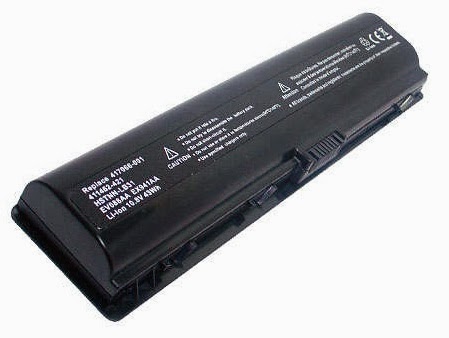
How to Take Laptop Battery Care of a Good and True

Battery in a laptop is a matter that must be maintained and should get special attention . Therefore , you are a laptop owner should know how to take care of Laptop Battery properly . Laptop battery itself will be easily damaged if left or did not get special treatment .

Laptop Battery

One of the batteries that are in decay heat is a simple battery and easy to wear out even though things mediocre . Following are 10 ways to take care of a laptop battery so durable and not easily damaged .
  1. Always install both the battery when in the off state and in a state of being carried on and charging .
  2. Charge the battery up to full time to recharge . Do not forget to close the adapter and use the battery level to a minimum until then do another recharge for several hours .
  3. When using , make sure the room temperature is in normal condition or not too hot . Use an extra fan if the weather is really hot .
  4. Avoid doing a poor system ie charge Charge Discharge ( CDC ) . When the battery is fully charged then the adapter must be removed when the battery starts to get low and you just plug the adapter again .
  5. Avoid as much as possible the battery to 0 %
  6. If it is full , then immediately unplug your laptop charger .
  7. Try not to do the work when doing heavy data rechargeable battery .
  8. Do not be too frequent refills , better fill it up and remove the battery when it is 100 %
  9. Avoid hot water and a battery of direct sunlight . Avoid also from dust that can damage components .
  10. Immediately replace the battery if thats not working optimally .

Those are some tips and tricks caring for your laptop battery to be more durable and have a long life . Remember to always save electrical power and always see to it that your laptop battery is not discharged to 0 % .

Reference:
http://frackasyster.blogspot.com/2013/06/tips-cara-merawat-baterai-laptop-dengan.html

How to Solve Error HRESULT 0xc8000222 Windows 7

Tuesday, October 29, 2013

Before posting I also have this problem , error out when it would install .Net Framework 4 in Windows 7 can install the new Feedback os windows 7 so rather katrok first time there is a problem that often arises when want Install variety applications/software such as work programs programmers and computer games in DirectX 11 technology.

.Net Framework 4

After investigation and diselediki turns out the answer is that the number of applications currently being developed for a specific version of the Windows platform and to run on the latest version of the platform itself so it can be customized and updated to reflect the needs of the user and the computer , not an error that is not can be solved but only just not compatible.

Because different versions of program components in the Windows Operating System and Driver Software computer or can not be separated again how the device is used or not depends specifications suport the latest computer technology today.

If you come across a similar problem with my install about trouble. Net framework now no longer need to bother, anxiety and so much less to think to reinstall the computer. How can be found solving many problems related to software that can not Install dikompi very easy to find, here as the author so it was counted for experience and also post updates here are the steps that should be applied.
  1. Open a command prompt as an Admin, I click Start -> Accessories -> right click on cmd -> Run as Administrator (not as a user)
  2. In the cmd screen type "net stop wuauserv" + Enter (without the quotes)
  3. Proceed with the cmd Let resistant keyboard running Windows + R cmd in the text box type "% windir%" (without the quotes)
  4. On the windows explore locate the folder "SoftwareDistribution" rename Rdold, Sdold or any free (as a sign only)
  5. Back on screen cmd as Admin was then type "net start wuauserv" now Install .Net Framework 4 in Windows 7
  6. Done!
For which there may not yet Framework 4 here Download .Net Framework 4 SKIP button to download yes and after downloading follow the steps as above. Noteworthy! for ye may be a new one in this or can install new windows xp, windows 7 etc or even just have a computer with the latest technology which has high spec.

Every time you want to install any programs that either games or program study materials if it fails to install it first read the Error notice what it is, do not play close aja hehe let the goal easy to solve related problems that occur on a computer without reinstall your computer (if allow) that much ok first just good luck wishes!

How to Eliminate Windows Build 7600 WAT

How to Eliminate Windows Build 7600 WAT (Windows Aktivation Technologies) is a term for trouble on Windows 7 OS. Actually, the core problem with the term Windows Genuine Advantage (WGA) on Windows XP, Vista where problem solving is not much different. It will be easier to use with the option RemoveWAT RemoveWAT version 2.2.5 or newer version RemoveWAT 2.2.7 version.

Authors have been posting how not to use manual and automated applications that use an application or software on How to Remove Windows Genuine Advantage (WGA). Incidentally new experience on Windows 7 because the OS has recently moved from XP to Windows 7 OS so much gamlang of this intentional element can hopefully be interesting reading material for my friends and I was able to post updates too (hehe). 9 for windows yet Inshallah ya later catch up if needed.

For my friends who do not know maybe, is what appears to be out notices like Windows Build 7600 on Windows 7 and Windows Genuine Advantage on Windows XP as well as its impact is because we prefer the free Indonesia. Impact for windwos 7 WAT trouble will arise, black blank screen and slow computer performance will lead to the virus will rapidly multiply in the computer.

Relevance is the OS, the operating system is not Original when the computer is connect to the Internet no windows update notification, is caused because windows update setting activated on the recommendation (the default), show the user the option Yes or No using the option Yes, the problem arises as a result WGA or WAT .

Good for the user's friends have probably bought a new windows PC or Laptop Computer and the like with a non original OS settings that do not look through the pages WAT System and Security following the steps.


Start -> Control Panel -> System and Security -> Action Center -> Windows Update -> Change Settings -> Important Updates, select as shown below.

Above is just an extra way to the fore warning no longer appears! from the windows, back kekasus. Sure you read this article because it has been caught using a windows OS gletongan robot or not original look at how to eliminate them as follows.

Way here I want to say in an automated way is to use an application or software to eliminate it, so do not use any complicated it would be easy to apply are as follows.
  1. Download RemoveWAT
  2. Once downloaded, disable antivir temporary protectionism -> Run RemoveWAT way aplication Right click on the software select Run as Administrator rather than a double click.
  3. Select the Remove button WAT see picture below, I'm using version 2.2.5 RemoveWAT wait for a while and usually after the computer will restart automatically - done.

    RemoveWAT 2.2

NB:
Authors recommend the original Operating System buy if you want to maximize your computer's performance without having to do this.

Make CD / DVD image (ISO)

How to Make CD / DVD image (ISO) to make the transition to storage / Backup data from one place to another has become routine even for the needs of computer users wherever and whoever they certainly often do . However, the data transfer is not always well done if you use the standard way as Copy Paste / Cut Paste files in general , what types of data are vulnerable to corrupt.

Make CD / DVD image (ISO)

In this case, we will talk about a data CD / DVD either the CD Driver , OS , Games , Software , Movie etc. . Allocate transfer of data from the regular file form takes up more space , a little more safe and can easily be reused at any time. In accordance with the title of the post only discusses Creating a CD / DVD image files ending with Iso easily limit case of this tutorial.

Before going into the work process , there are preparations you should take note and follow . Recommendations from this I certainly appropriate title for the results and hope you are easy and do not regret it after you read the article here . Preparations for Creating ISO File is sure software / application you are in accordance with the tutor and recommendation here is Using UltraISO Software.

Steps to Create an ISO File - Option I:
  1. Insert CD / DVD into the laptop / your company as an example I use the CD Driver.
  2. Open Application UltraISO. Select the File menu and then Open the CD / DVD. Once open let the process of adding the file is complete. See the following figure.


  3. When finished select Tools> Make CD / DVD image ... (F8), select Output FileName / placement will be saved Iso File> Make button to let the process finish. See the process as shown belo


  4. If you want to see results and its Iso ISO data content of the above process after the process is completed (CD / DVD Image Duplicate OK!) Select Yes, if not No. - Done!. As shown below.


Steps to Create an ISO File - Option II:
  1. Follow step No.. 2 in Option I.
  2. Select the File menu and then Save As> select the storage location and file type using the file extension is ISO. Look like picture


  3. Then click save and wait until the process is completed - Done!!!

Is a tutorial that I can share on this occasion. Hopefully other times when I can come back again with a new case and other related Computer Science, & Tricks and Tips. Enjoy!!!